
Do's and Don'ts in Technical Reports about Term and Thesis Projects
(Updated: )Reading time: 11 minutes

Content Outline
Springtime is thesis writing time in many universities. This post shares editorial advice from thesis reviewers and provides a checklist of questions they tend to ask. It does not claim to be complete or representative.
Context
This post targets students (and their advisors) in projects with software as a deliverable on varying levels of desired quality and maturity (from demonstrators and proofs-of-concept to minimum viable products). Such projects qualify as design science research and development; think of Web applications, mobile apps, command-line interfaces, and engineering (analysis, design, review) methods being designed and built — for a particular domain or as general-purpose tools.
I supervise(d) close to 50 student projects in the last twelve years (on bachelor and master level), and reviewed additional reports in co-examiner roles. As many thesis/term projects are team efforts, I worked with about 100 students. My OST page in the Internet Archive/Wayback Machine has a timeline (under “Betreute Arbeiten” or “Knowledgebase”).
The post reflects and reports on questions I frequently received and feedback I often provided.
Content Advice and Editing Rules
Dear thesis writer, when reporting your project results, please make sure to:
- Think about the wants and needs of your target audience to decide what to include and what to leave out. Be aware of the curse of knowledge bias; remember the time when you learned about the subject matter. Organize the report material and structure in a diamond shape, with a corner at the top/start and at the bottom/end 🔹. In other words, start with an overview and introductory material on a rather high level of abstraction, then go into details and elaborate in depth and close with summarizing and concluding material (rule of thumb: “narrow-wide-narrow”).1
- Think of the Table of Content (ToC) as the architecture of the report, with chapters and sections as components. Just like in software engineering and architecture, readers will appreciate high cohesion of paragraphs and low coupling between them; the same holds for sections and chapters. A seamless logical flow of information makes the report straightforward to follow.
- Find a catchy and representative title. Unfamiliar technology or product names will not help your report to be found and read. New or uncommon abbreviations also fail to generate interest. Ideally, let the title unveil the application domain and key technical concepts in 2-3 nouns each.
- Establish a vocabulary, the Published Language of your thesis. Use this vocabulary consistently, starting with title, abstract and chapter/section headings. Introduce as few new terms as possible, as many as needed. Highlight these terms on first use, for instance by setting them in italics. Collect and explain key terms and concepts in a glossary if you cannot expect your target audience to be familiar with your Published Language. Practice Domain-Driven Design (DDD), with s superset of the report terms forming the Ubiquitous Language for the source code and all other project artifacts (user documentation, APIs and their API descriptions, configuration files, etc.).
- Design the abstract to make readers curious, but do not overpromise. For academic works, context-problem-solution-discussion-outlook is a common structure. Use it to get started and then fine tune for the target audience. See this post for more advice how to write in review-friendly ways (and how to review).
- Report results, the outcome of your project (the as-is situation at submission time or when freezing features and content) rather than activities (the way to get to the results, with all its ups and downs). A technical report is not a journal, log or diary. Move reference material such as project plans and API specifications to appendices; other material only relevant for parts of the target audience also can go there.
- Provide evidence for all claims made, by pointing at your own work (in same report) or the literature.
- Use an engaging writing style and tone. In most places, a factual writing style is in order. Opinions, assessments and judgments have their place but should clearly articulated as such. Each section should make readers curious and eager to read on:
- When and assessing technologies, products, open source projects etc., be critical but also polite and empathetic; you do not know the context and constraints under which they were crafted (your creations will also be commented and judged , and you will probably appreciate if this is done in a professional, constructive and friendly way).
- Avoid jovial terms from colloquial speech (“Umgangssprache” in German). Terms and idioms that will stand the test of time are the way to go.2
- No marketing jargon either please! Save phrases such as “breakthrough innovation” with “splendid usability”, promising “double-digit growth” for product owners and “shaping a bright future for society” for a future go-to-market leaflet or flyer.
“How is this ordered?” is a question Gregor Hohpe asks when reviewing documents including a list or grouping. See his rambling “Writing for Busy People”.
Let’s move from structure and style to formal editing rules (editorial must-haves):
- Use standard terminology for structure elements and headings for the type of document you write. Reports up to 20 pages (in 10-12 pt fonts such as Arial or Times New Roman) do not have chapters but sections as heading level 1; from 20 to 100 pages (not counting appendices), chapters can be introduced, but usually no parts are needed. Chapter parts grouping chapters make sense for documents with significantly more than 100 pages.3
- Do not introduce single-child relations in the table of content. No structural element wants to be a loner. Example: If there is a Section 2.1, there must also be a Section 2.2. Hint: If you create the first subsection in a section, immediately add a second one (with some placeholder text); if you cannot think of a suited heading for it, ask yourself why you created the first one. The same advice holds for chapters and subsections (hint: avoid sub-sub-sections and even deeper nesting levels). Strive for balanced chapter and (sub-)section sizes.4
- Start each chapter, section and subsection with text, not with figures, tables or (sub-)sections. Text-free starts let your report might come across as incomplete or immature.
- Find a suited, multi-modal media mix, blending text and figures/tables/listings/screen captions. People are different and so are their learning preferences (abstract-concrete, concept-example, text-figure etc.). Page after page filled with plain text is much harder to comprehend and appreciate than sections with a sound media mix.
- Use suited standard notations in figures when available. Call out the diagram type when using such standard (example: UML class and sequence diagrams)5. Provide legends when using custom notations. When working with colors, be aware that some readers might be color-blind or read print outs that cannot be zoomed in. Make sure that the figure/diagram is understandable in black and white prints; grey scales help with that.
- Refer to each figure in the text, addressing it by its number or name. Do the same for tables and listings. Design the logical flow from figure to figure (and the relationships between the figures) as carefully as you design the flow of text.
- Talk reader through figures and tables. Explain all or representative figure elements (e.g., boxes, arrows) and table data. Use exactly the same labels (words and their capitalization) in text and all figures/tables. The consistency of component names and invocation/dependency arrows requires particular attention; readers want to locate the explanations of figure elements in the text easily.
Room for improvement6 can frequently be observed in draft reports; this happens to novices and experienced writers. Final versions then can improve significantly if enough time for review-revise cycles is still available.
Start drafting text and structure early! Some of the editing advice and rules will only become relevant as your content grows over time. Readers will appreciate your effort and investment!
(English) Language Issues
The first two the hints on names and dangling references apply are language-independent:
- Avoid dangling and/or incomplete references. When you start a sentence, use “This argument explains” rather than just “This explains…”.
- Do not let “This” and similar references spawn across paragraph boundaries. Cross-paragraph references create unpleasant coupling.
- Spell names exactly as the owners of the name (product, website, service, company or other organization, person) do. GitHub, it is, not github or Git-Hub or Github or GIT HUB. You might receive other advice; for instance, brand names such as e-business and iPhone had a hard time getting accepted as acceptable spellings when they were young. If in doubt, ask your thesis advisors for their preferences and check out official guidelines at your institution. Be consistent throughout your document; double check how your school or university calls itself in English and other languages.
The next set of tips and rules assumes English as the report language:
- Capitalize names serving as identifiers, and such names only. The World-Wide Web (WWW) is a singleton and uniquely identifiable by this name and its short form, hence, I have been taught to write “the Web” (although some writers and editors prefer “web”). I do not captitalise “Cloud” as there is more than one.
- Figures, tables, chapter and sections have names, which should be capitalized. Write Figure 1, Table 2.2, Chapter 3, Section 3.1, but “in the following chapters, …”.
- Watch out for grammatical subtleties. For instance, it is correct to write “allow doing something” and “allow somebody to do something”, but “allow to do something” is not correct (transitive vs. intransitive usage of the verb: gerund vs. preposition).
- Do not use short forms such as don’t, can’t, isn’t in formal technical writing. This is common in oral conversations and can be seen in blog posts too. When quoting somebody literally, the short forms can be used in technical writing as well.
- Hyphenate properly. When and when not to use a ‘-‘ between words is a running gag when editing books and proceedings; rules seem to vary (and/or changed over time). Have a look at Scribbr. At a minimum, be consistent throughout your document.
- Be aware of the split infinitive. I’ll let Grammarly explain the concept and when (not) to use it.
I cover zombie nouns and noun stacking, both to be avoided, in this post (in the section “Technical writing”).
Keep things simple, clear and consistent! Not all but some readers will be native speakers. You want your content/results and your report design to be judged, not your mastering of the English language.
Key Content
Most if not all thesis reports I have seen featured the following content:
- Introduction, context and topic/goals, organization of the report.
- State of the art and the practice before this project (why needed?), background information required to understand the remainder of the report.
- Functional and Non-Functional Requirements (FRs, NFRs), domain model.7
- Design (on conceptual level), e.g., software architecture.8
- Implementation, realization of the design (in source code, configuration files, deployment scripts and so on).
- Discussion whether and how and how well project goals, FRs and NFRs were achieved, reporting test user or early adopter feedback (aka validation, evaluation results) and/or providing a self -assessment.
- Summary and/or conclusions, outlook.9
- Bibliography.
- Appendices: project and risk management, methods applied, quality assurance, test setup and reports, reference manuals.
- Some advisors also like to see glossaries, list of tables, list of figures.
- Finally, there might be mandatory sections such as an “Eigenständigkeitserklärung” (declaration of authorship/originality).
Ideally, the content elements listed above can easily be discovered in the table of content. They do not necessarily have to match your report chapter structure 1:1.
Note that some institutions require you to submit two versions of the report, an internal one taht will be graded and an external one that might be published in an institutional repository such as eprints (example: https://eprints.ost.ch/). Follow the guidelines what to put where (and what not to put into the external version) diligently. For instance, names of people and their contact information typically must not be published; meeting protocols, time reporting and other project-internal details also typically do not belong in published technical reports. And you might want to check whether any “Error! Reference not found” messages or [?] markers created by your text processing software made it into your PDF files by accident.
Every report has an architecture, hopefully an intentional one. Design it to support your thesis goals and related report quality requirements!
Sample Theses
Have a look at the following reports for inspiration:
- Cloud Events Router, MQTT and AWS SQS in action in an IoT scenario, using arc42 to structure the design documentation in an appendix.
- Context Mapper, DSL and tool for DDD, featuring use cases/user stories and NFRs.
- Service Cutter, presenting a catalog of coupling criteria as a conceptual contribution in addition to a tool.
One reason I picked these three theses as examples is that they are written in English; a second reason is that they led to conference papers (go to this page if you are interested and look for co-author names such as “Basig”, “Lazzaretti”, “Kapferer”, “Gysel” or “Kölbener”).
It is ok to deviate from advice given, due to context and tradeoffs involved!
Find your own way, but get inspired by previous thesis reports. We have all been there!
Pre-Submission Checklist
Dear thesis report writer, when preparing your thesis for submission, please check:10
- ☐ Has the target audience (roles, skills, needs) of the report been defined, made explicit, explained and addressed? Do the built software (or other result/deliverable) and the supporting documentation do so?
- ☐ Does the report structure have an adequate, recognizable structure flowing from brief/small to detailed/deep and back to brief/small (aka “diamond shape”)?
- ☐ Does the Table of Content tell the thesis story (unveiling key concepts/results)? Do the figures alone do (when viewed independently of the text)?
- ☐ Are all figures referenced and explained in the text?
- ☐ Are all lists ordered adequately, for instance those with a bullet item layout?
- ☐ Has the report been spellchecked? Has the grammar been checked?
- ☐ Are all TLAs introduced when used for the first time? See this post for some common TLAs (which stands for Three-Letter-Acronym).
- ☐ Is the bibliography balanced in terms of publication type and age (depending on the topic, citing some scientific papers rather than online resources such as vendor websites, blogs and Wikipedia is the norm or at least expected)? Have the URLs of online resources been timestamped (“last accessed yyyy-mm-dd”)?
Note the deliberate overlap with the advice given under “Content Advice and Editing Rules”.
Check the content too, not just the structure and formalities:
- ☐ Are all chosen names expressive and driven by domain concepts, so that the target audience will be able to understand and relate to it? Does the same hold for section headings and figure captions, for features and user interface elements in the developed software, for the domain model and architecture diagrams, and so on?
- ☐ Is the solution context established (when to use it, terminology in the application domain)?11 Are the deficits in the state of the art and the practice identified and explained?
- ☐ Is the project vision motivated? Are the requirements resulting from it specified? Is there a section targeting non-experts in subject matter (end users, management), sometimes called lay summary? Have the quality goals been defined in a SMART way?
- ☐ Are the conceptual design and its implementation described on a level of detail that allows to assess its requirements fit, soundness, novelty? Is it reproducible/implementable?
- ☐ Are the design decisions documented and justified? Are options compared by criteria? Can the decisions be traced to design and implementation (and their documentation)?
- ☐ Is the level of achievement of project goals and requirements discussed? Are user tests described and its results commented on?
- ☐ Do code and supporting documentation have a quality that justifies publication (e.g., in an open source project, in a public Git repository)?
- ☐ Can software engineers without specific expertise build, install and run the developed software? Are end users able to work with it without training or when following the users guide?
The questions in the checklist also remind us of technical writing advice from previous posts.
Each “no” answer is a call to action. Improve the report accordingly, or explain why you were not able to answer “yes”.
Explain to yourself and your team colleagues first, followed by your advisor; sometimes, it makes sense to include such explanations in the report.
More Information and Related Content
Online information about the topic is abound. Just a few examples (not necessarily specific to computer science or software engineering) are:
- “Guide to Technical Report Writing” for staff and students, School of Engineering and Informatics, University of Sussex.
- “Guide for Writing Technical Reports” by Michael Brooks and Fran Saunders, adopted from “Guide for Writing Technical Reports” (Third Edition, 2007).
- “Report Writing Guide for Engineers”, Paul C Hagan and Pam Mort 2000 to 2018.
- For some projects, it is important to know “How To Write A Lab Report”.
“How Theses Get Written: Some Cool Tips” by Steve Easterbrook, Dept of Computer Science, University of Toronto, has a broader scope. Starting from a clarification what a thesis actually is, it covers examination issues, how to get started, planning your argument as well as thesis construction. “Say everything thrice” is one piece of advice from it that I also give.
Wrap up
This post provided 24 hints, typical content elements, sample reports and 16 checklist questions for term and thesis report writers:
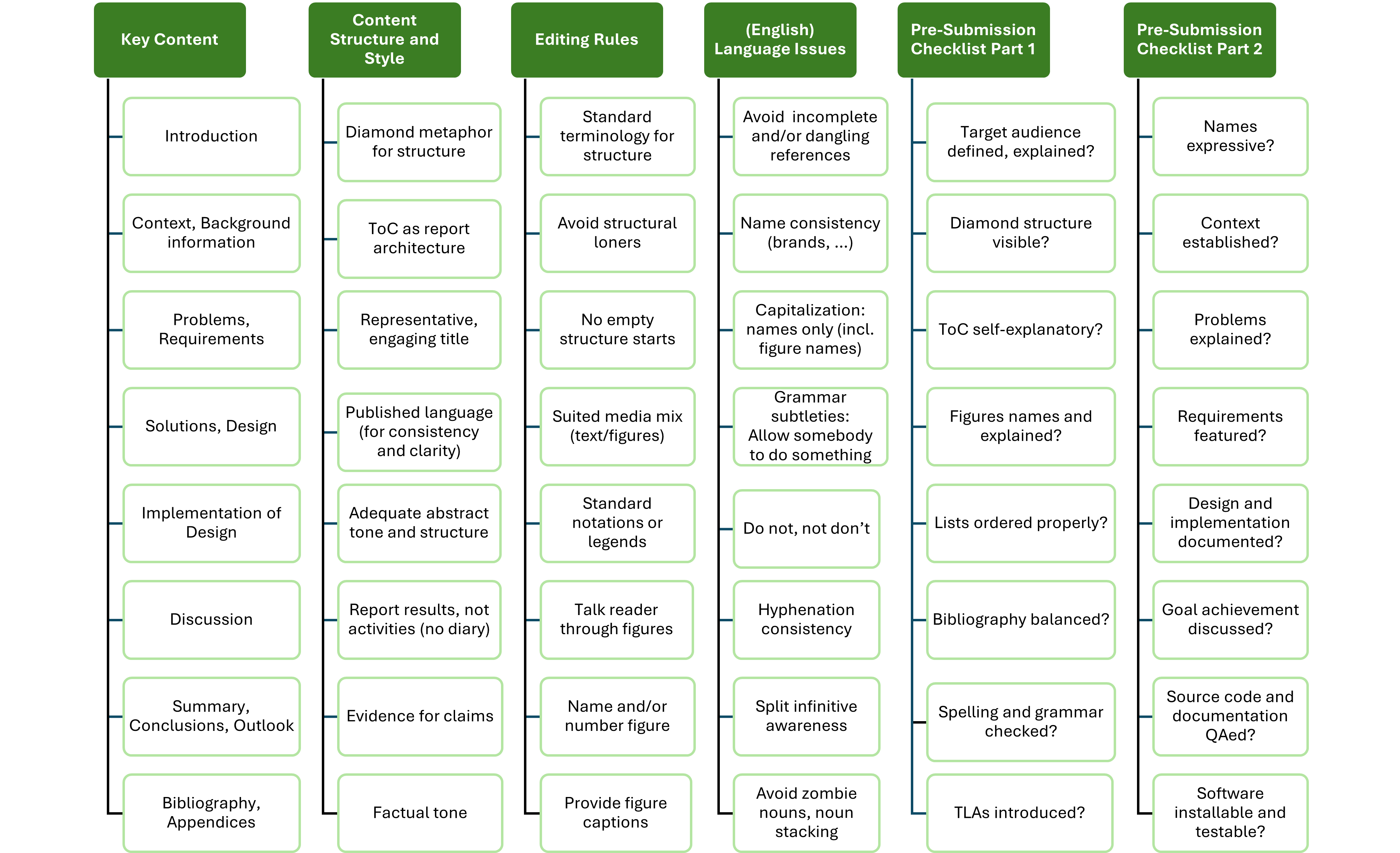
Note while this post sticks to most of the advice given (or at least tries to do so), it does not conform to each and every editing rule… it is a blog post and not a thesis report, after all!
The advice in this post stems from bachelor and master thesis projects, as well as term projects placed earlier in the curricula. Much of it can also be applied when writing other types of technical documents, for instance PhD theses, research papers, grant proposals, project reports for funding agencies, and deliverables in professional services engagements.
Following as much of it as possible and making sense it the context of your project makes your reports more accessible, increasing the chances for it to be read and liked, used and cited. 😀
Now, go write! 12
– Olaf (aka socadk, ZIO), with help from the Cloud Application Lab (CAL) team at OST and more thesis advisors.
Notes
-
Rhomb (“Raute” in German) would be an alternative metaphor. Triangle, curvy road and maze are less suited approaches to structuring. 😉 ↩
-
Just like your results, hopefully. You never know but worth trying! ↩
-
See guidelines from publishers and Latex commands for details. And you might want to find out which range of report size is expected and accepted; quality has higher priority than quantity. ↩
-
We are back at the report architecture, the diamond metaphor, cohesion and coupling! ↩
-
UML continues to have an important place in the software designer and report writer toolbox IMHO, despite some prominent voices sending a different message. 😉 ↩
-
A much nicer term than “deficit” or “flaw”. Having room is good! ↩
-
See Design Practice Repository (DPR), a method reference, for explanations and related practices. DPR is also available as an eBook on LeanPub. ↩
-
DPR has an Architecture Modeling activity. ↩
-
There is a difference between a mere summary and a conclusions section. A summary repeats what has already been written (in short form). Conclusions are drawn, which yields content appearing for the first time. ↩
-
If you care about your grade. 😉 ↩
-
This can be achieved by a glossary, domain model or informal background section. ↩
-
This end note is a variant of the one that Werner Vogels, CTO Amazon Web Services (AWS), used to end his AWS re:Invent conference keynotes with: “now go build”. ↩